English
- AI Face Swap
- AI Editor
- AI Video
- Pricing
Transform Your Ideas with AI Image to Image Online
Revolutionize visuals with our AI image to image online tool. Upload photos and apply creative styles instantly for stunning, high-quality results.
Model


Image Upload
Drag & drop your image here
we accept JPG, PNG or WebP up to 24MB
Prompt
0/2000Boudoir photoshoot
Replace to bikini
Change hair color
Mosaic remover
Object remover
Style transfer
Old photo restoration
Aspect Ratio
Free times remaining: 0


My Creations
Latest 10 on this deviceNo history yet. Generate your first image to get started!
Get started!Maintain Consistency in Image to Image Workflows
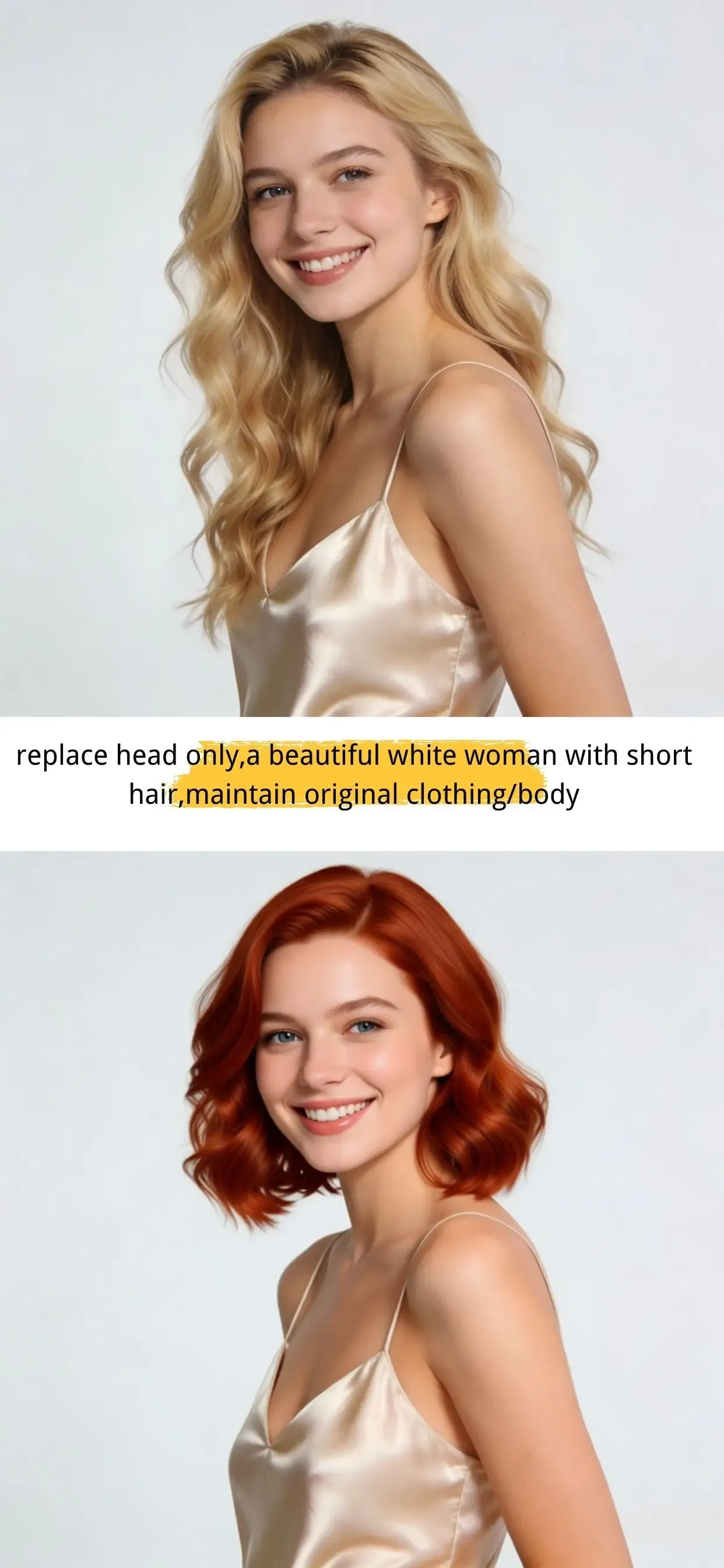
Consistency is the biggest challenge in generative art, but our AI image to image online tool solves this completely. You can change outfits, hairstyles, backgrounds, and other visual elements, without losing consistency. Or keep the body and clothing identical and swap only the head for seamless AI face swap feature. This is essential for storyboards, brand assets, and game art production, where visual continuity is non-negotiable.
Apply Artistic Filters via Image to Image
Stop spending hours in complex editing software. Our image to image AI acts as an intelligent creative filter that understands the context of your photo. Whether you want to turn a landscape into a Monet-style oil painting, a portrait into a cyberpunk illustration, or a sketch into a photorealistic render, the AI interprets your prompt while respecting the original image's edges and depth.
Experience Professional Image to Image AI for Free
We believe powerful tools should be easy to access. That’s why our AI Photo Editor offers a free tier, so you can try professional AI image-to-image editing right away. Use the same high-quality AI technology trusted by creators, and see how it transforms your reference photos. Just upload an image, add a prompt, and create.
Full Control Over Image to Image AI Variations
With a simple prompt, you can tell the AI exactly what to change. Just describe your idea or give a clear command, and it will edit the image based on your instructions. Want small touch-ups like Unblur Image and light improvements. Or want a bigger style change. You decide how closely the result should follow your original photo.
How to Perform Image to Image Conversion
A simple 3-step guide to transforming your visuals instantly.
Upload Your Source Image
Drag and drop your reference photo into the dashboard. We support common image formats like JPG and PNG, so you can start your creative workflow smoothly.
Describe Your Desired Image
Enter a text prompt detailing the changes you want. Be specific about style, lighting, and texture to help the AI image to image tool understand your vision.
Instant Generation & Export
Click generate and watch as the AI transforms your image in seconds. Preview the results, upscale if necessary, and download your high-resolution artwork.
What Makes Our Image to Image Tool Stand Out
Loved by thousands of creators worldwide, our AI tools deliver results fast.
Professional-Grade Image to Image Fidelity
Our algorithm preserves the core structure of your original photo while applying new styles, ensuring the final output remains recognizable and high-quality.
Secure & Private Image Processing
We value your privacy. We never share your images with third parties, and we don't store your creations. Please download your results promptly.
Cross-Device Compatibility
Access our AI image to image online tool from any browser. Whether on a desktop, tablet, or smartphone, enjoy the same powerful features without installing apps.
Affordable Plans for Heavy Users
We offer high-value plans designed for different user needs, so you can choose the most cost-effective option for your workflow.
Who Needs AI Image to Image Solutions?
Discover how different industries utilize our transformative AI technology.
Marketers: Rapid Visual Content Creation
In the fast-paced world of social media, speed is everything. Marketers use image to image AI to repurpose one photoshoot into dozens of stylistic variations for A/B testing ads. You can take a standard product shot and instantly place it in a futuristic setting, a cozy living room, or a hand-drawn explainer style without organizing a new shoot.
Designers: From Rough Sketch to Polished Image
Interior designers and product developers love our tool for its ability to interpret "scribbles." Upload a rough napkin sketch of a chair or a room layout, and use the AI to render it as a photorealistic product. This accelerates the prototyping phase and helps clients visualize the final result before any 3D modeling begins.
Photographers: Creative Photo Restyling
Photographers use our platform to expand their creative portfolio. It allows for "mixed media" experimentation, such as turning a landscape photograph into a watercolor style or changing the season of a wedding venue photo from summer to winter. It adds a layer of post-processing magic that Lightroom simply cannot achieve.
Hobbyists: Turning Selfies into Avatars
For the casual user, it is all about fun and identity. Users upload selfies to generate unique avatars for gaming profiles or social media. Transform yourself into a superhero, a medieval knight, or a claymation character while keeping your facial structure intact.
What Users Say About Our Image to Image Tech
Real feedback from creators who have transformed their workflow.
" I used to spend days rendering sketches. Now, I upload my line work to this AI image to image online tool, and I get 10 variations in minutes. It dramatically speeds up my client approvals. "
Alex R.
Concept Artist
" Most AI tools lose the original subject's likeness. This tool is different. It keeps the composition of my product photos perfect while changing the background style. Highly recommended for e-commerce. "
Sarah L.
Marketer
" I am not technical at all, but the interface is intuitive. I turned my travel photos into anime-style art for my blog effortlessly. The free trial was generous enough to get me hooked! "

Mike T.
Blogger
FAQs about Image to Image
Find quick answers to common questions about our AI tools and features.